
After Smart Builder drafts a study, review the questions before using it with participants.
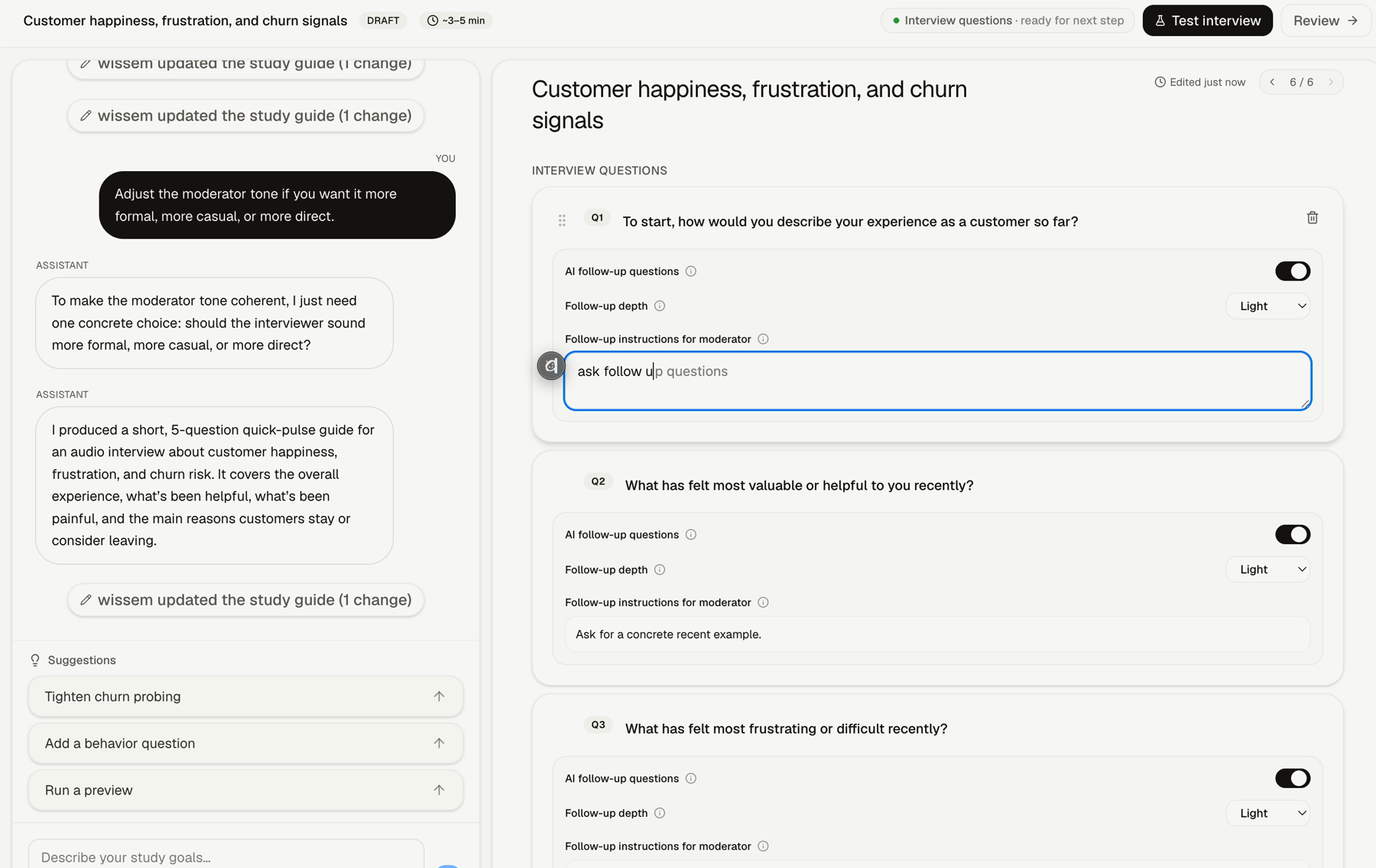
How To Edit Questions
Step 1: Open the questions step
After the study context is ready, generate or open the interview questions.
Step 2: Review each starter question
Make sure each question is specific enough to guide the participant.
Step 3: Turn AI follow-ups on or off
Use AI follow-up questions for questions where Lemma should probe beyond the first answer.
Step 4: Choose question-level depth
Choose the follow-up depth for that question, such as Light, Medium, or Deep.
Step 5: Add follow-up instructions
Use the follow-up instructions field to tell Lemma what kind of detail to pursue.
Good Follow-Up Instructions
Use instructions that name the kind of evidence you want. For example:
- ask for a concrete example
- ask what happened before the decision
- ask what made the answer frustrating or useful
- ask what the participant tried before
- ask what would have changed the outcome
FAQs & Common Issues
Should every question have AI follow-ups?
No. Use follow-ups where the first answer is likely to need more context.
What makes a question too broad?
If the question could fit any study, make it more specific to the audience, situation, or decision.
Can I give different follow-up instructions per question?
Yes. Use question-level instructions when each question needs a different kind of probing.