
A Sequence is the ordered LinkedIn work for one Lead in one Mission.
Inspect the Sequence
Open the correct view
Use Open for current work or Needs you when Lemma has an action for you. Use Open → Problems for failures and blockers.
Open the row
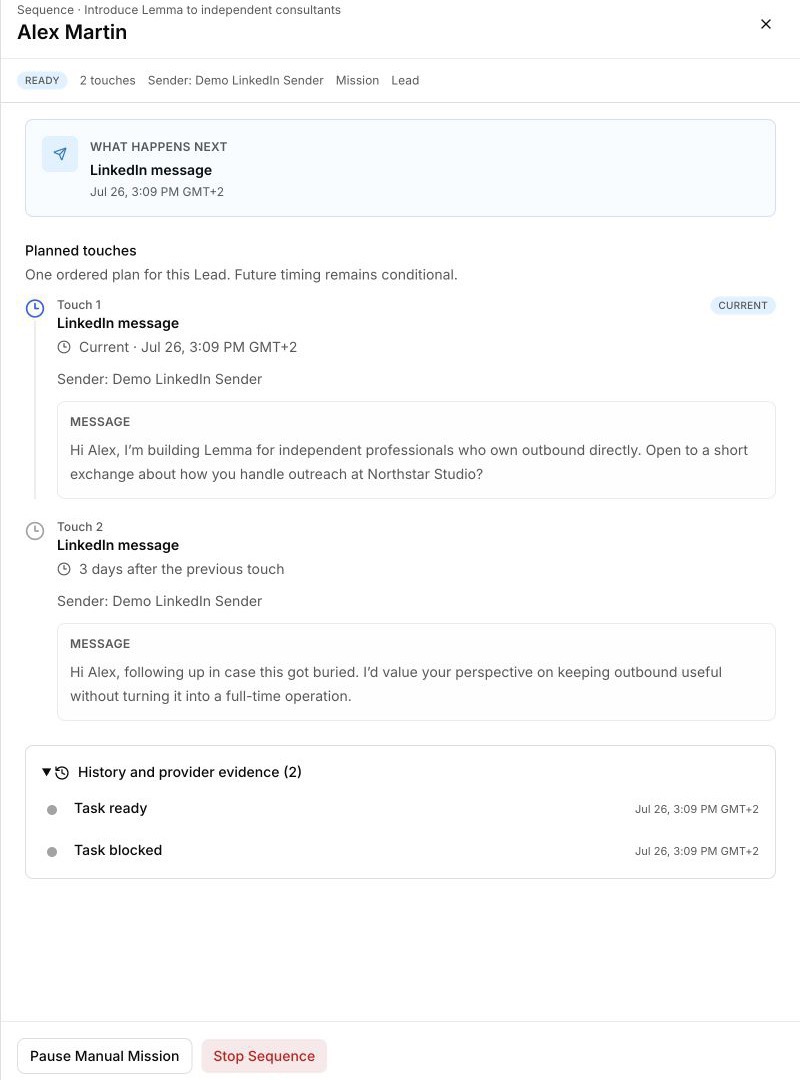
Confirm the Lead and Mission before acting. The drawer header links back to both.
Read What happens next
Check the next channel, conditional time, Sender, and current status.
Read Planned touches
Inspect the messages in order. Future timing can remain conditional on an invitation acceptance, a prior confirmed send, no reply, the Sender schedule, or another state.
Check History and provider evidence
Expand the history before retrying, stopping, or concluding that a LinkedIn action happened.
Lemma-led Mission approval
Return to the Lemma-led Mission for Review approval, Auto approval, and the current Approve or Deny request.
This Mission-level decision is distinct from validating the message bodies of an individual Sequence in Outbox.
Lemma-authored Sequence actions
Open an eligible Lemma-authored Sequence under Open. Before a touch is sent or locked, the drawer can let you:
- edit a touch body with Save touch;
- remove an unsent touch with Delete touch;
- append a LinkedIn connection or message touch with Add a touch;
- use Send date and Reschedule on an unfrozen touch to re-anchor the eligible pre-send chain; every eligible touch shifts by the same amount, so the selected touch lands at the requested time and Sequence spacing is preserved;
- choose Prioritise sending or Normal priority for all eligible pre-send tasks in the Sequence;
- choose Validate sequence to approve and freeze the current bodies for that prospect.
Each edit creates a new immutable revision; prior work remains in history. Validation is an approval boundary, not proof of an external send.
Use Batch validate above the Sending plan to validate selected eligible rows. After filtering Outbox to one Mission, Validate whole mission validates its currently eligible Lemma-authored Sequences. A Sequence that changed after display is skipped rather than silently validating a stale revision.
These controls live in Open. A Lemma-led Sequence does not need to appear under Needs you for its editor or validation controls to be available.
Manual Sequence actions
The current drawer can offer a subset of:
- Save new revision — saves an edit to the current reviewable message body;
- Approve or Approve and next — approves the current revision;
- Retry task — safely re-queues the identified failed task;
- Pause Manual Mission or Resume Mission — changes the Manual sending hold for that Mission;
- Stop Sequence — stops future cold touches for this one Lead and Mission;
- Queue reply — queues the read-only suggested response with the originating Sender.
Only use an action when it is visible. If the drawer does not offer it, the current Sequence is not eligible for that operation.
Adding, removing, rescheduling, prioritising, and batch validation apply to eligible Lemma-authored Sequences. The current Manual contract does not promise those structural controls, and a suggested reply remains read-only.
After an action
Confirm that:
- the Sequence state changed;
- the next touch or hold reflects the action;
- no provider-confirmed history was erased;
- the action affected only the intended Lead, Mission, or Manual sending scope.