
A Ready Sender is usable, not unlimited. Lemma still applies its schedule, daily targets, reservations, provider conditions, and the state of each Sequence.
Read the Sender card
Open Settings → Sender.
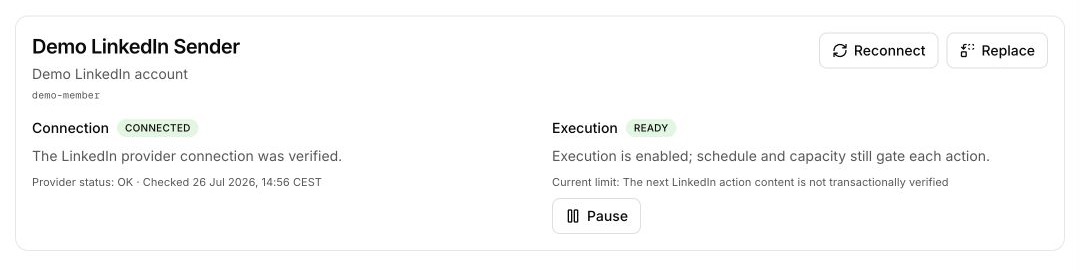
Shows Connected or Disconnected, the provider explanation, provider status, and the last checked time.
Shows Dry run, Ready, Paused, Restricted, or Unavailable, plus the current reason and any next eligible time.
If the projection is stale, the page shows the last verified state and disables controls until Retry succeeds.
Read sending capacity
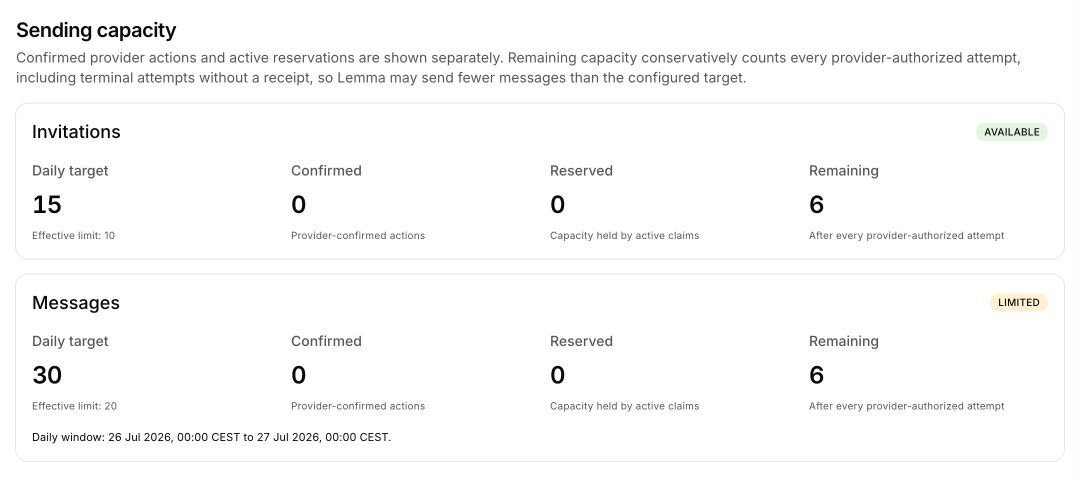
Invitations and messages are reported separately:
- Daily target — the configured desired ceiling;
- Effective limit — the current ramp- and provider-safe ceiling;
- Confirmed — provider-confirmed actions in the current daily window;
- Reserved — capacity held by active claims;
- Remaining — capacity that can still be considered after confirmed activity, reservations, and conservative provider-authorized attempt counting.
The Binding safety limits card appears when another limit is tighter. Lemma may perform fewer actions than the configured target.
Understand the automatic capacity warm-up
The warm-up applies to effective capacity and starts with the first provider-authorized outreach activity, not when you connect the Sender.
| Sender class | Invitation ceiling | Message ceiling | Ramp period |
|---|---|---|---|
| Paid, Sales Navigator, or Recruiter | 10 → 25 per day | 20 → 80 per day | 14 days |
| New, free, or unknown | 5 → 20 per day | 10 → 40 per day | 21 days |
The configured daily target remains your desired ceiling. Increasing it does not bypass the ramp: Lemma uses the lower applicable limit. Actual available capacity can be lower again because of the active schedule, provider conditions, confirmed activity, or reservations.
Configure the active schedule
Set daily targets
Enter whole numbers of zero or more in Invitations/day and Messages/day. A target is the desired ceiling, not a promise to use all available capacity or a way to bypass the current effective limit.
Choose active days
Select at least one day. Lemma should wait when a touch falls outside an active day.
Set the window and timezone
Set Start, End, and a valid timezone such as Europe/Paris. The Sender’s schedule is evaluated in this configured timezone.
Save and verify
Choose Save settings, then return to Outbox to inspect the next known touch.
Outbox formats timestamps and date groups in Europe/Paris, even when the Sender schedule uses another timezone. Its editable Send date field uses the browser’s local timezone. Home activity and the Audit log use UTC. Confirm which clock produced a value before diagnosing or rescheduling an early or late action. See How Lemma displays time.
Why work can wait
Common reasons include a future scheduled time, a closed active window, exhausted capacity, an intentional pause, a provider retry boundary, a pending LinkedIn event, or another active claim.
Lemma also spaces and varies otherwise eligible Sender actions. The schedule and daily target define boundaries, not an exact delivery cadence.
Waiting does not mean an external attempt failed. Open the Sequence to read its timing condition and history.