
The Mission page depends on how the Mission was created.
- A Lemma-led Mission combines the Lemma conversation, approvals, Mission details, and lifecycle controls.
- A Manual Mission shows operational metrics, queue truth, audience exclusions, and direct Pause or Resume controls. It does not expose the Lemma-led conversation or approval menu.
Read a Lemma-led Mission
Read the page in this order:
- Mission name, public status, and Lemma-led mode.
- The current conversation or approval request.
- The approval choice and next action.
- Mission readiness and provider-backed KPI line.
- Objectives and the persistent Lead work cards.
Each Lead work card can show the canonical LinkedIn plan, current work state, and attached worker evidence. Open the Lead or its worker only when the current card offers that action.
Answer Lemma
Use the Mission conversation for clarification and corrections. When Review approval requires a binary decision, the request appears in the thread with Approve and Deny.
Approve only the specific request shown. A prior approval does not authorize a materially different audience, Sender, or message.
Choose the Lemma-led approval mode
Open More mission actions:
- Review approval keeps future consequential requests waiting for your decision.
- Auto approval applies to future LinkedIn Sequences only. Existing approval decisions stay unchanged.
The approval mode does not override the Sender schedule, daily targets, Do not contact, Lead eligibility, holds, or provider restrictions.
Rename a Lemma-led Mission
Choose the pencil beside the Mission name to edit the display name or regenerate one from the goal. Renaming does not change the goal, audience, Sender, Sequence, approval history, or provider evidence.
Open Mission details
Choose More mission actions → Mission details. When available, the read-only drawer shows:
- Goal and ICP;
- the success contract, including definitions, deadline, and targets;
- recent compressed intelligence.
This is a compact Mission record, not a complete research-source feed. Use the Lead drawer for field-level source, confidence, and freshness information.
Control a Lemma-led Mission
- Pause after this turn — the current Lemma turn may finish, but a new Mission turn does not start.
- Resume — continues a paused Mission.
- Hold LinkedIn — stops provider-side LinkedIn activity for this Mission while Lemma can continue research and drafting.
- Resume LinkedIn — removes that channel hold.
- Complete Mission — stops new Mission work and preserves the result as history.
See Pause, hold, stop, or complete work before using an emergency control.
Read a Manual Mission
After Launch, a Manual Mission shows:
- Selected, Eligible, and Blocked Leads;
- total Tasks, provider-confirmed Sent, Waiting, and Problems;
- queue-state counts;
- the blocked-audience breakdown preserved from Launch;
- direct Pause or Resume and Open in Outbox controls.
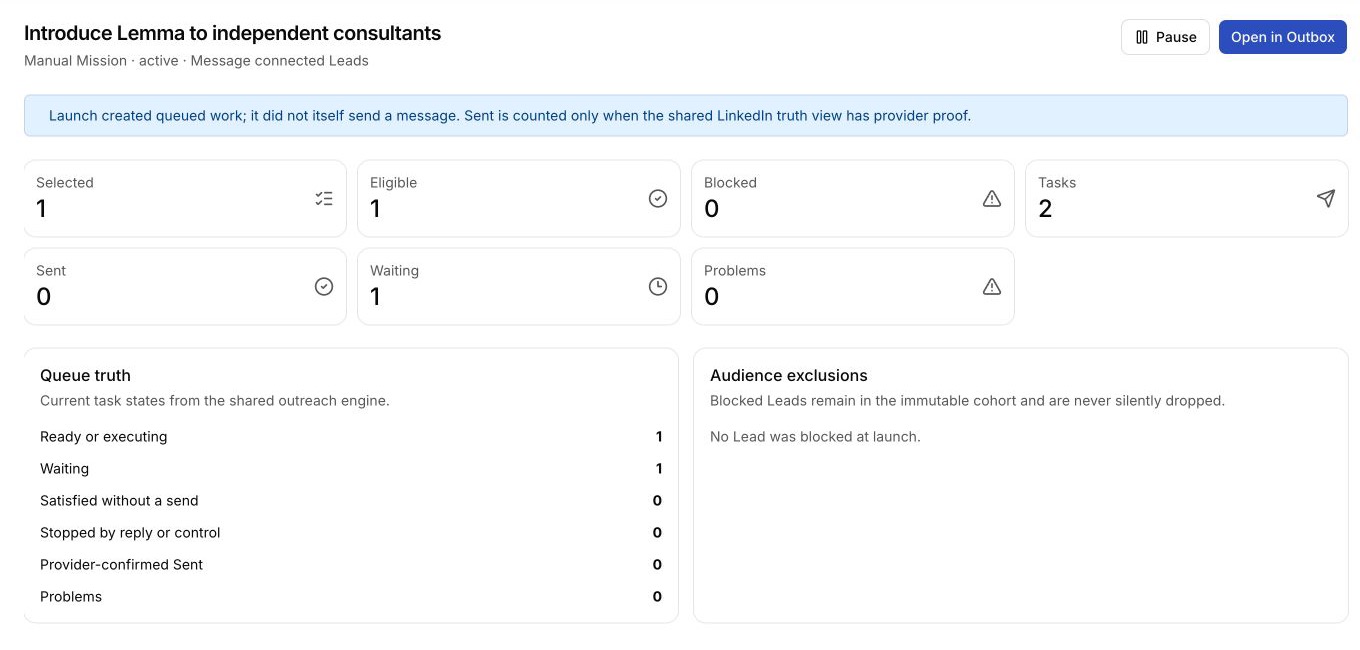
Use Outbox to inspect or stop one Manual Sequence. A Manual Mission does not offer the Lemma-led Hold LinkedIn, Auto approval, or Complete Mission actions.
Finishing, reports, and terminal states
If a provider-authorized task is already sending when you complete the Mission, it can enter Finishing until that in-flight task settles. Completed and Failed Missions are read-only.
A terminal Lemma-led Mission can show a completion report with:
- People targeted;
- People messaged and Actions confirmed when provider evidence exists;
- Meetings booked;
- remaining action-needed items;
- per-Lead progress and the read-only transcript.
An em dash means that provider-backed evidence was unavailable; it does not mean zero.
Next action
Open Outbox to monitor Sequences across Missions.